

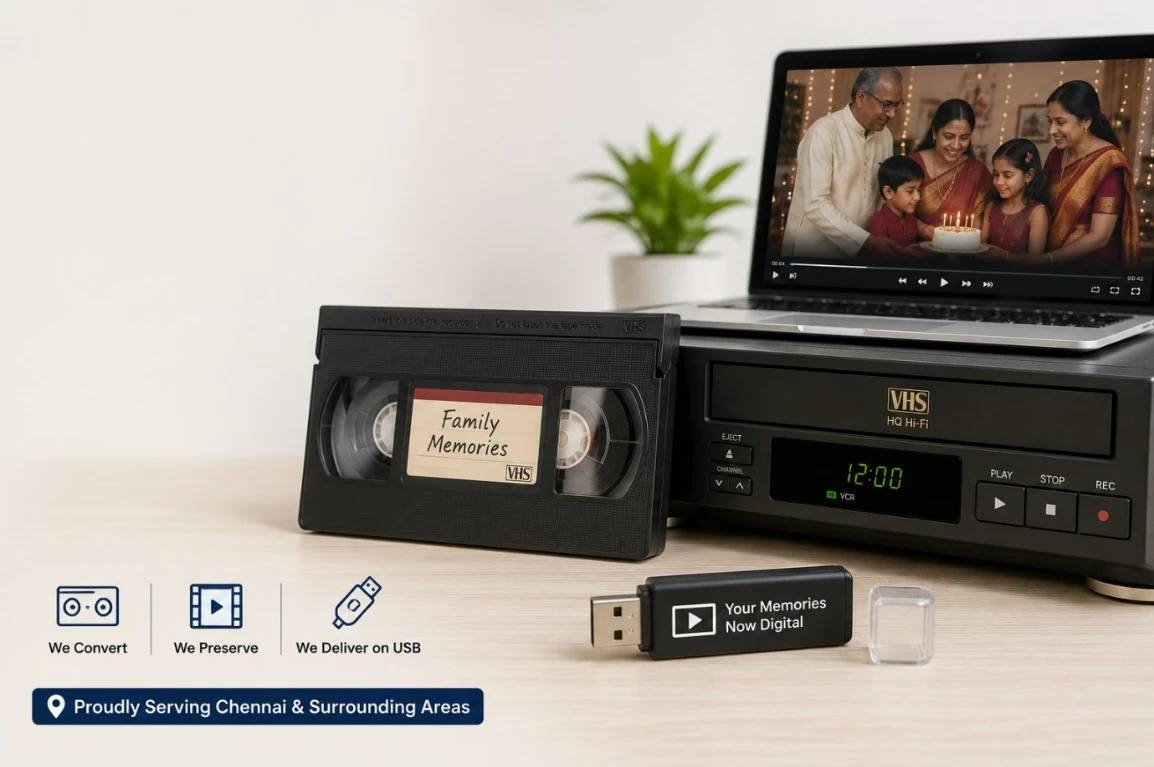
Ultimate Guide to VCR, VHS and Cassette to Digital Conversion in Chennai
What Is Legacy Video Digitization?
Legacy video digitization is the process of converting analog video media into digital files. The term includes VHS, VCR recordings, and cassette-based home videos. Digitization preserves content that would otherwise remain trapped on aging physical media.
Definition
Legacy video digitization is the conversion of analog recordings into digital formats for preservation, access, and playback on modern devices.
Analog tapes store video as magnetic information. Digital files store the same content in a computer-readable format. That difference matters because analog media becomes harder to use as the original machines disappear.
Why this matters
Old tapes face several risks:
- magnetic wear
- dust and mould
- stretched tape
- loss of playback quality
- device obsolescence
A digital version makes the content easier to protect and access.
Common examples of legacy video digitization
- Family home videos
- Wedding recordings
- School and college events
- Cultural or religious functions
- Archival footage
- Personal recordings stored on old cassettes
Why Convert VHS, VCR, and Cassette Tapes to Digital?
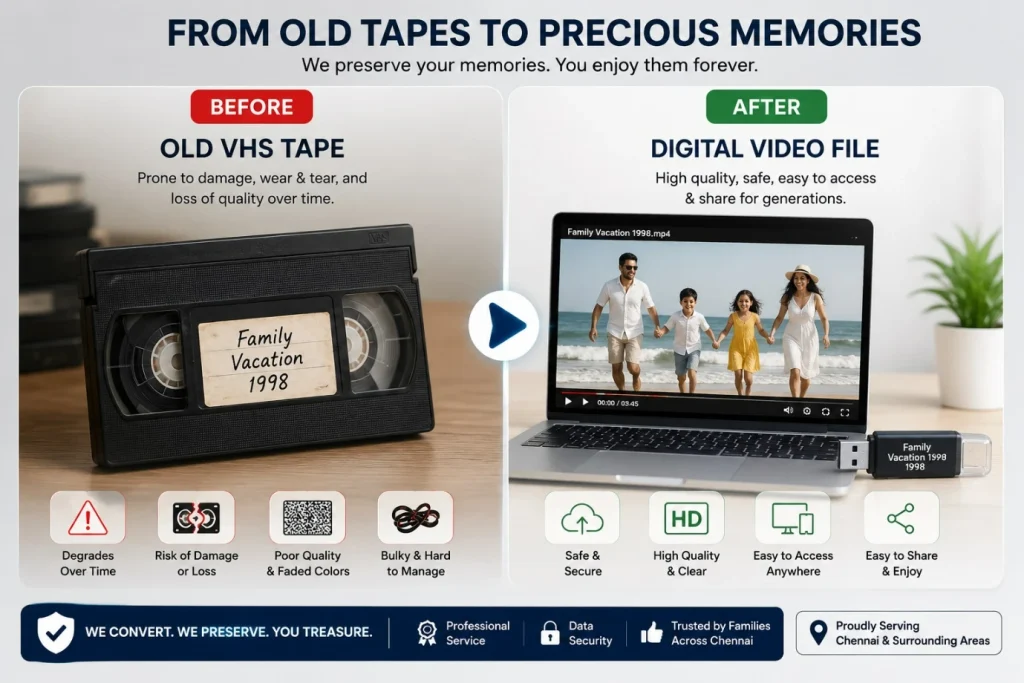
Converting old tapes to digital helps prevent permanent loss. Tape-based media degrades over time, and the quality of playback drops even when the tape is stored carefully. Digital conversion gives the recording a second life in a format that is easier to store, duplicate, and play.
Direct answer
The main reason to convert VHS, VCR, and cassette tapes to digital is preservation. Digital files are easier to access, back up, and share. They also avoid the practical problem of finding working tape players in the future.
Main benefits
- Protects memories before the tape deteriorates further
- Makes old videos playable on modern devices
- Reduces dependence on aging VCR machines
- Supports backup on multiple storage devices
- Improves accessibility for families and archives
Why tapes degrade
Analog tapes are physical media. Over time, the magnetic layer weakens. Heat, humidity, dust, and repeated playback can all reduce quality.
Definition
Tape degradation is the gradual loss of image or sound quality caused by age, storage conditions, and physical wear.
Common signs that a tape should be digitized soon
- Flickering playback
- Sound dropouts
- Lines or tracking issues
- Jammed or brittle tape
- Visible mould or dust buildup
- Tape shell damage
Trusted VHS to Digital Conversion in Chennai
Thousands of family memories deserve expert preservation. We carefully convert your VHS tapes, VCR cassettes, MiniDV, Hi8, Video8, and audio cassettes into high-quality digital files, ensuring the best possible output with safe handling.
What Output Formats Can You Choose?
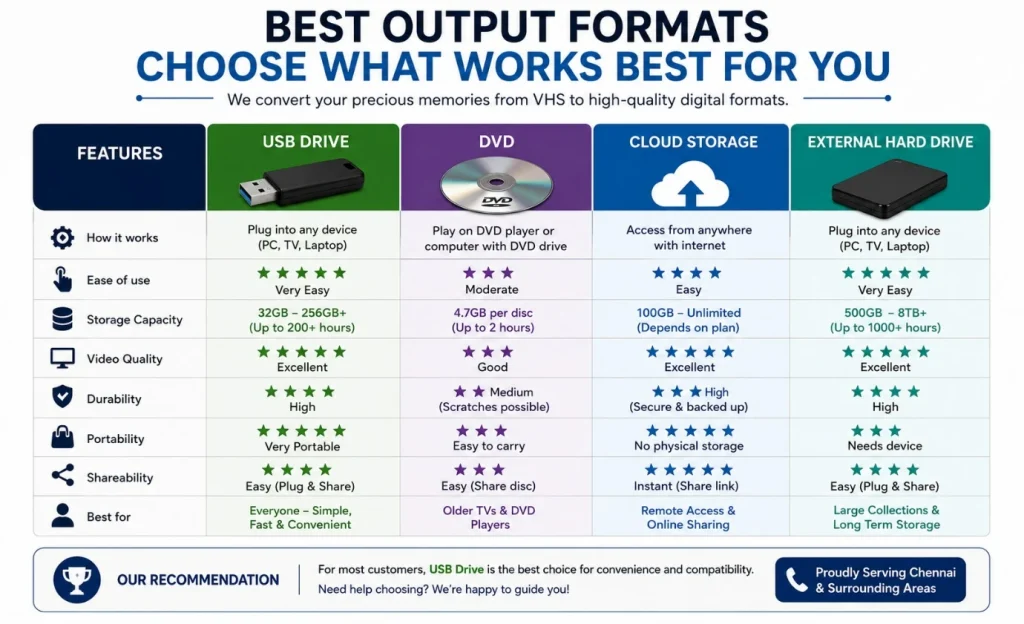
The right output format depends on how you want to use the converted video. Most users choose USB, MP4, or external drive delivery because those options are simple and compatible with modern devices.
Direct answer
The most practical output format for most users is a digital video file saved on a pendrive or USB drive. That format is easy to store, copy, watch, and share. MP4 is especially popular because it works on many devices and platforms.
Common output formats
- USB / Pendrive
Good for easy handover and local storage. - MP4
Widely supported and ideal for phones, laptops, TVs, and cloud backups. - MOV
Often used when higher-quality editing compatibility is needed. - DVD
Useful for users who still prefer disc playback. - External hard drive
Suitable for large collections or long-term storage.
Short definition
MP4 is a digital video format widely used because it balances quality, file size, and compatibility.
Which output is best?
For most households, MP4 on a USB drive is the most flexible option. It is simple to keep, easy to duplicate, and works well for sharing.
How Does the Conversion Process Work?
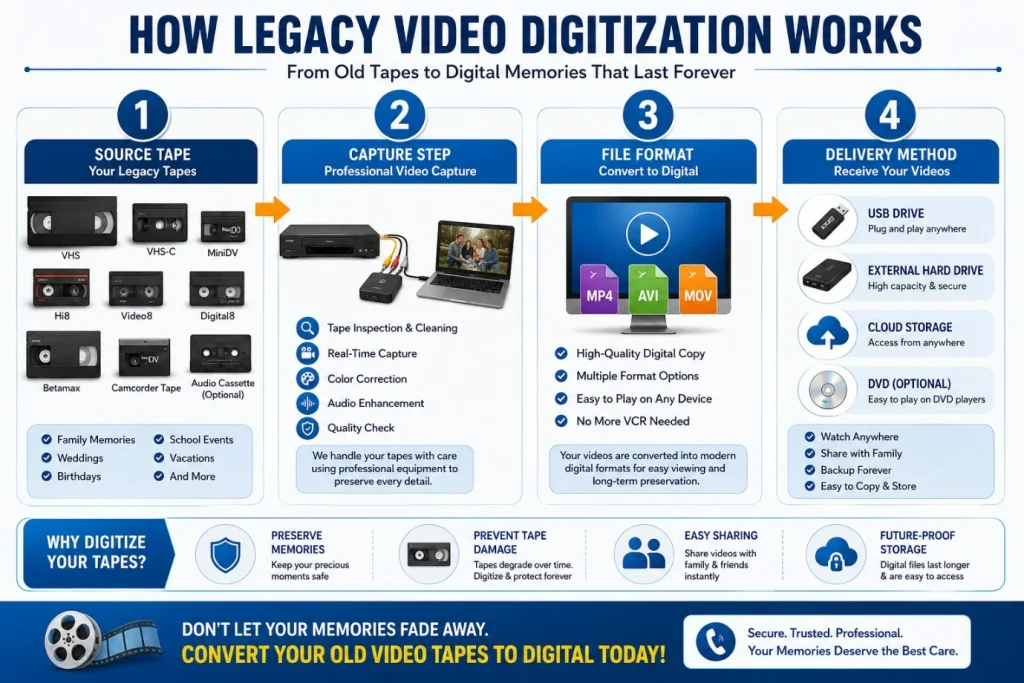
The conversion process usually starts with tape inspection and ends with digital delivery. A professional service captures the analog signal from the tape and converts it into a file that can be stored on a pendrive, hard drive, DVD, or cloud folder.
Direct answer
VCR to digital conversion works by playing the original tape through a compatible deck and capturing the video signal with conversion hardware. The captured signal is then saved as a digital file and delivered in the format requested by the customer.
Step-by-step framework
- Inspect the tape
The service checks the cassette for damage, mould, or playback issues. - Test playback
A compatible deck is used to confirm whether the tape can play safely. - Capture the video
The analog signal is transferred through a capture device into digital form. - Save the file
The video is encoded into a chosen file format such as MP4 or MOV. - Organize delivery
The final file is transferred to a pendrive, hard drive, DVD, or other medium. - Return the media
The original tape and the digital copy are handed back to the customer.
Why professional capture matters
Poor capture settings can create lower quality output, unstable audio, or compression artifacts. Professional services reduce those risks by using appropriate playback and capture equipment.
DIY vs Professional Conversion
Some users try to convert tapes at home. Others prefer a professional service because the process is simpler and less risky. The right choice depends on the number of tapes, the condition of the media, and the importance of the recordings.
Direct answer
Professional conversion is usually better when the tapes are valuable, old, damaged, or numerous. DIY conversion may work for a small number of tapes, but it often requires hardware, time, and technical knowledge.
Comparison table
| Factor | DIY Conversion | Professional Conversion |
|---|---|---|
| Equipment needed | High | None for customer |
| Technical skill | Moderate to high | Low |
| Risk to tape | Higher | Lower |
| Quality consistency | Variable | More consistent |
| Time required | Longer | Faster for customer |
| Best for | Experimentation or low-value tapes | Important memories and archival content |
When DIY makes sense
- You have technical experience
- You already own the required equipment
- The tapes are not highly valuable
- You want to test the process
When professional service is better
- The tapes are irreplaceable
- The recordings are old or fragile
- You want better quality control
- You need convenient delivery on USB or digital file
Convert Once. Enjoy Forever.
From weddings and birthdays to childhood memories and family celebrations, preserve your priceless VHS tapes, VCR cassettes, and audio recordings in high-quality MP4 format on USB. Relive and share your memories with future generations on any modern device.
What Affects Conversion Quality?
Conversion quality depends on the condition of the tape, the playback device, the capture process, and any cleanup applied during transfer. A bad tape may still be converted, but the output can only be as good as the source allows.
Direct answer
The final digital quality is shaped by the original tape condition and the quality of the capture workflow. If the tape is damaged or poorly stored, the digital copy will reflect those limitations.
Key quality factors
- Tape age and storage history
- Playback deck condition
- Capture device quality
- Audio-video signal stability
- File compression settings
- Restoration or cleanup steps
Common quality issues
- Color fading
- Audio distortion
- Tracking noise
- Frame jitter
- Dropouts and static
- Line interference
Important note
A digitization service can preserve the best possible version of the tape. It cannot fully restore information that is already lost from the original media.
What Types of Tapes Can Be Converted?
Most legacy video digitization services handle common consumer tape formats. VHS and VCR recordings are the most frequently requested, but many services also support related tape types.
Direct answer
The most common media converted to digital are VHS tapes, VCR recordings, and other analog video cassettes. Some services also handle additional legacy formats depending on available playback hardware.
Common supported formats
- VHS
- Standard VCR tapes
- Home video cassettes
- Event recordings
- Certain camcorder tape formats
Why format support matters
Different tape formats need different playback systems. A service with broader format support can handle more kinds of old recordings without requiring the customer to source rare equipment.
Real-World Use Cases
Legacy video digitization is useful in personal, family, and institutional settings. The main value is preservation, but the convenience of digital access is also important.
Direct answer
People convert old tapes to digital so they can preserve memories, share recordings easily, and reduce the risk of permanent loss. This is especially useful for family archives and one-time event footage.
Common use cases
- Family home videos
Preserve childhood recordings, vacations, and milestones. - Weddings and celebrations
Keep important life events in a safer format. - Religious and cultural functions
Save ceremonial recordings for future generations. - Institutional archives
Convert older internal media into searchable digital assets. - Personal collections
Organize multiple tapes into a clean digital library.
Scenario example
A family with 20 VHS tapes from the 1990s may no longer have a working VCR. Converting those tapes to MP4 files on a USB drive allows the family to view and duplicate the recordings easily.
How to Prepare Tapes for Conversion
Preparing tapes properly makes the conversion smoother. Clear labeling and careful handling help the service identify content, manage priority, and reduce delays.
Direct answer
Before conversion, organize your tapes, check for visible damage, and decide whether you want delivery on USB, DVD, or another digital format. Good preparation saves time and helps prevent handling problems.
Step-by-step preparation checklist
- Sort the tapes by label or date
- Check the tape shell for cracks or damage
- Look for mould, dust, or sticky residue
- Keep tapes upright in a cool, dry place
- Note any special instructions
- Choose the preferred digital output format
- Separate important or fragile tapes for priority handling
What to avoid
- Opening the tape shell
- Playing damaged tapes repeatedly at home
- Storing tapes in heat or humidity
- Mixing unlabeled tapes without notes
Comparison of Output Options
Different delivery options suit different needs. USB is best for convenience, DVD suits disc users, cloud works for remote access, and external drives are useful for large collections.
Direct answer
USB or pendrive delivery is usually the easiest option for most users, while external drives are better for large collections and cloud storage is useful for remote sharing.
Comparison table
| Output Option | Best For | Advantages | Limitations |
|---|---|---|---|
| USB / Pendrive | Most households | Simple, portable, easy to share | Limited storage capacity |
| MP4 file | Broad compatibility | Works on most devices | Needs a storage location |
| DVD | Disc playback users | Familiar format | Less flexible than files |
| External hard drive | Large collections | High storage space | Bulkier and costlier |
| Cloud delivery | Remote access | Easy sharing and backup | Requires internet access |
Frequently Asked Questions
VHS to digital conversion is the process of transferring video from a VHS tape into a digital file. The output is usually saved as MP4, MOV, or another modern format that can be played on current devices. The main purpose is preservation.
Yes, many old VCR tapes can still be converted if the tape and playback conditions are usable. A professional service can assess the tape first and determine whether a safe transfer is possible. Even damaged tapes may sometimes be partially recovered.
MP4 is usually the best format for most users because it is widely supported and easy to store or share. MOV may be preferred for certain editing workflows, while DVD or USB delivery can be useful for specific preferences.
The tape is played through a compatible deck, captured by conversion hardware, and saved as a digital file. That file is then copied onto a pendrive or USB drive. This method is popular because it is simple and easy to use.
The digital copy will preserve the tape’s content, but it will not automatically improve poor source quality. If the original tape is faded or damaged, those issues may still appear in the digital file. Digitization protects what remains.
Turnaround depends on the number of tapes, the tape condition, and the service workload. Small orders may be completed quickly, while larger or damaged collections may take longer. A service usually gives an estimated completion time upfront.
Damaged tapes should be handled carefully. A professional service may be able to clean, inspect, or recover some content, but results vary. The earlier a damaged tape is digitized, the better the chance of preserving usable footage.
Professional conversion is usually better for important, fragile, or high-value tapes. DIY conversion can be suitable for hobby users, but it often requires equipment and technical know-how. Professional services reduce handling risk and provide more consistent output.
Yes, pendrive delivery is a common option for video digitization. Many customers choose a USB drive because it is easy to store, copy, and play on modern devices. It is one of the most practical delivery methods.
Yes, it is one of the best ways to preserve family videos. Digital files last longer than tapes when backed up properly, and they are much easier to view, duplicate, and share with relatives.
Key Takeaways
- VHS, VCR, and cassette tapes can be converted into digital files.
- Digitization protects recordings before tape degradation becomes severe.
- MP4 on a USB drive is the most practical option for many users.
- Professional conversion is safer for important or fragile tapes.
- Tape condition and capture quality affect the final result.
- Digital files are easier to share, store, and back up.
- Legacy video digitization is valuable for families, events, and archives.
Get a Free Quote in Minutes
Tell us how many VHS tapes, VCR cassettes, MiniDV, Hi8, Video8, or audio cassettes you have, and receive a transparent, no-obligation quotation. We’ll recommend the best digital format and delivery option for your needs.
Conclusion
VCR, VHS and cassette to digital conversion is the best way to preserve old recordings before time, storage conditions, and outdated playback equipment make them harder to recover. A professional service can help transfer tapes into a usable digital format such as MP4 on a pendrive, making the content easier to store and share.
If you have old family videos, event recordings, or archival tapes, now is the right time to convert them. The earlier the transfer happens, the better the chance of preserving the best possible version. To get started, request a quote or book a conversion with a trusted digitization service.

Antony Bebin
Antony Bebin is a Digital Intermediate Specialist with 10+ years shaping the look of films and content in post-production. A color grading expert fluent in DaVinci Resolve, he bridges technical precision with creative vision — from raw footage to polished final outputs. When he writes about color, he's lived every frame of it.
